Thursday, January 26, 2012

Adopting Retrospectives? Start by learning to learn

Retrospectives is a great practice that is widely adopted by agile teams. I've worked with a large number of teams across different organizations and one of the first lessons you learn after you coached a number of teams is that while improving team performance to deliver faster and better is important, what's even more important is the team learning to learn. Continuous improvement is a big commitment, and not easy to do especially for knowledge work. That's why I tend to take a different approach for teams new to retrospectives and instead of setting improvement as the goal for them, I focus them into learning how to discuss problems in a structured way and coming up with simple tactical fixes that can be implemented fast. 

Structured - many teams struggle to discuss problems effectively, the first goal is to find a simple framework to structure the problem discussion. A simple one I use often is setting a simple matrix on a big whiteboard, the top row I place the discussion topics, divide them with vertical lines and then divide the verticals horizontally into 4 buckets, challenges, causes ("why"), easy fix, harder fix. This is a simplified 5 whys approach to root case analysis. I then get the team to brainstorm and start mapping stickies into these buckets. This provides a simple structure to the conversation.

Simple and Fast - Once the team identifies a number of improvements or fixes they believe can improve their problems, I encourage them to start by selecting the simple ones. Within their span of control, limited analysis needed, and easy to implement. Finally, the fixes should be fast to do, 1-2 days max in effort and duration.

It's not initially important whether the fixes actually provide sustainable improvement or not. That will come with time once the team learns how to learn by tackling smaller changes often. This approach allows them to move at their own pace, is sustainable and will likely provide a positive reinforcement as they can finish what they started. Stop starting and start finishing also applies to continuous improvement.

Thursday, December 8, 2011

Five Step Illustrated Guide to Setup a Kanban System in an Enterprise Organization

We've been through a significant number of Kanban implementations and our approach has largely been based on the approach outlined in David J. Andersons Kanban book. During our travels, we find that we sometimes need to make certain adjustments to the standard steps and during our recent work with a large-scale organizational transformation where we are applying Kanban across the entire organization of 200+ people we have encountered some situations that you only run into when you are in a larger enterprise setting. I thought it would be useful to others for me to provide a real-world step by step illustration of how we have been approaching the problem. If your about to kick-off a Kanban adoption in an enterprise IT organization or in the midst of one and struggling, you may find this useful. It's a simple 5 step approach that has always produced good outcomes for us while respecting the pace of change a typical IT organization can absorb.

Step 1) Identify the various upstream and downstream groups with a special emphasis on external "support groups" for the group adopting Kanban

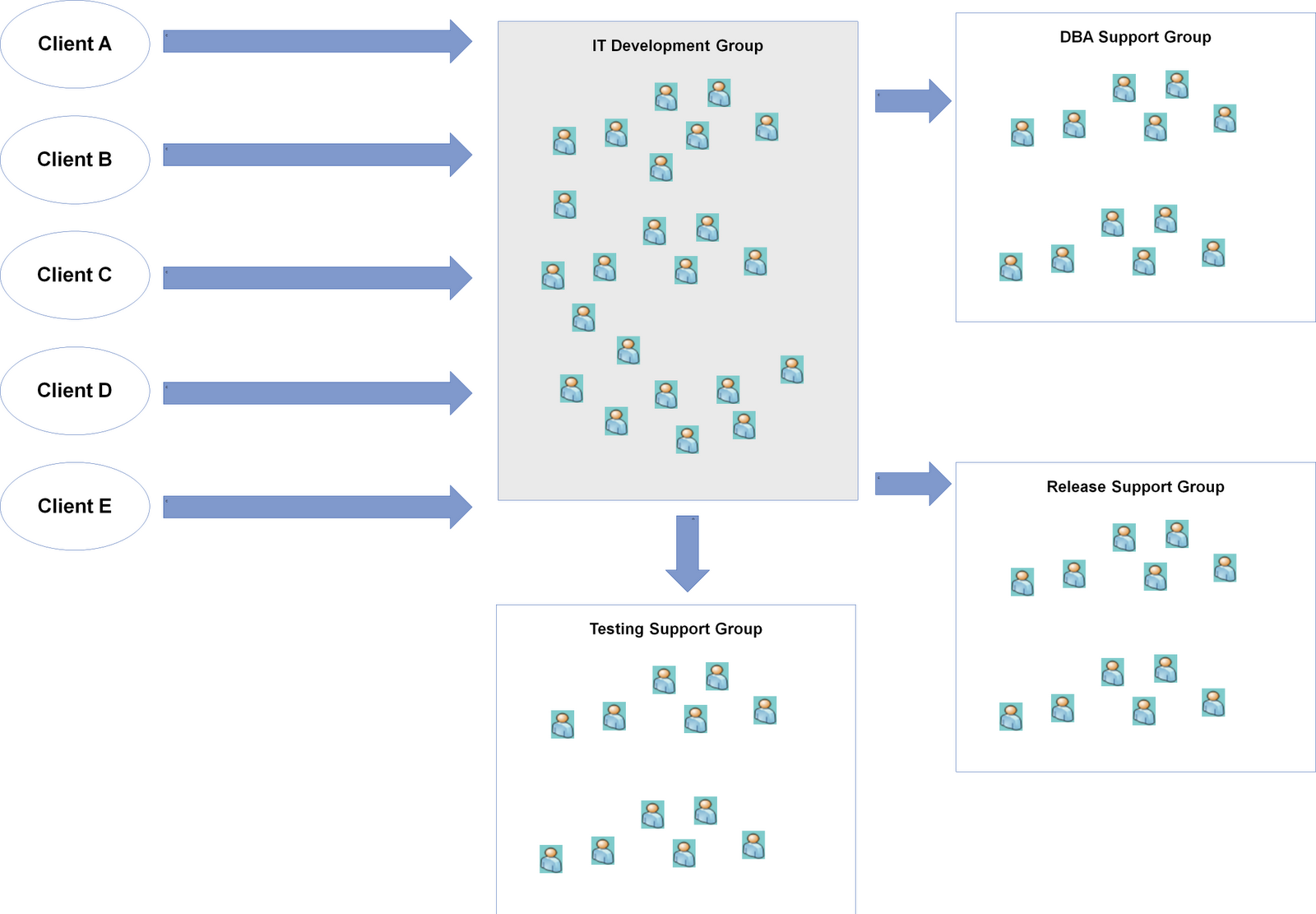
In our scenario, we were helping an IT Development Group adopt Kanban. To start, we need to first identify who are upstream parties that give us work, in this it's the clients/business themselves that have a PM/BA function and there are 5 of them. There is one downstream group, the Release Support Group that is responsible for packaging, and pushing code into staging and production. The final group to look at is other support groups which tends to be a key consideration in enterprise settings since most IT organizations have moved towards functional consolidation. For this particular group, they rely on a DBA Support Group, and a Testing Support Group in order for them to complete their work and pass it to the release group.


Step 2) Identify the work types that come in from the upstream provider and work with the IT Development Group to agree on a set of standard work types to setup a "Work Type Filter"


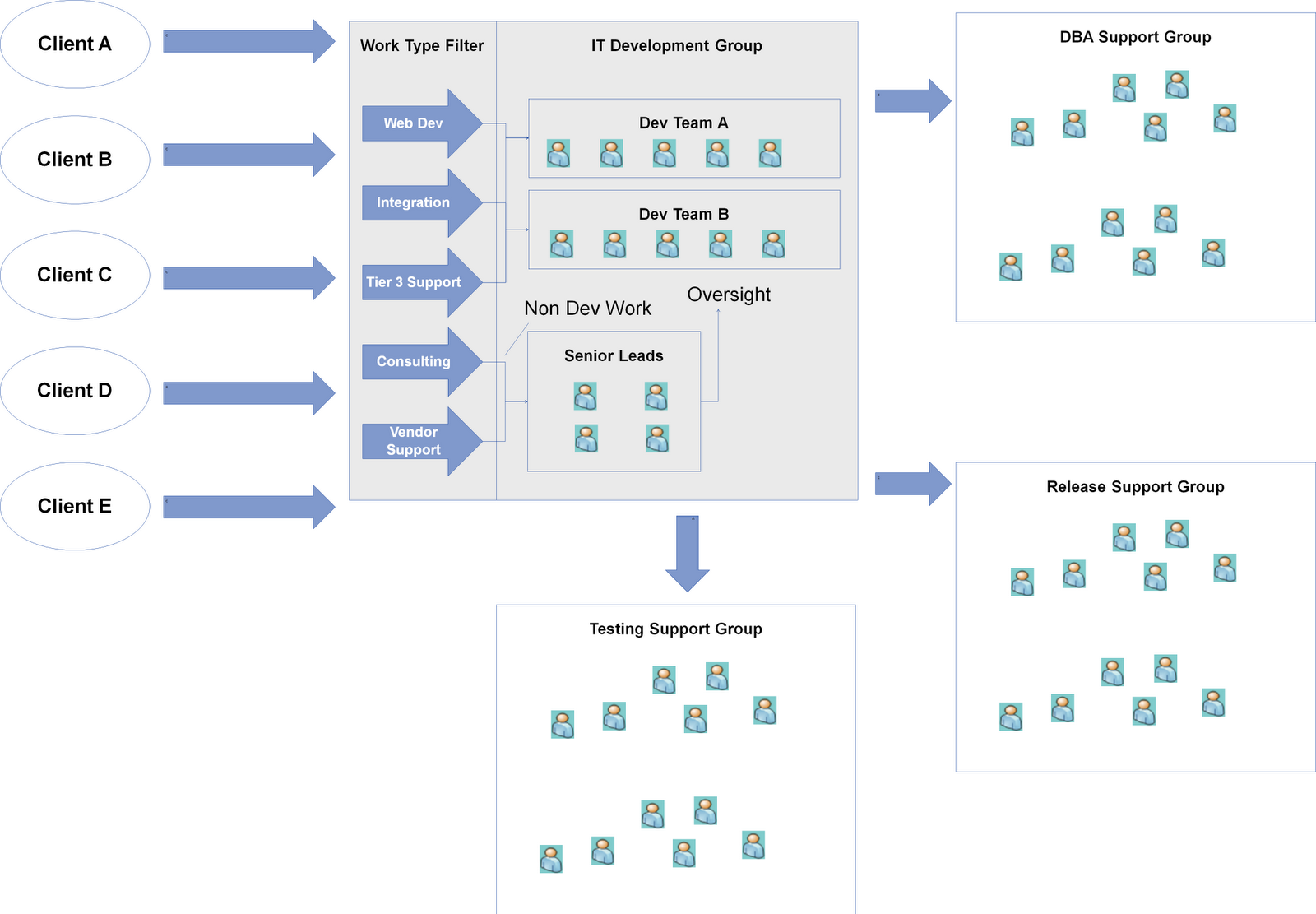
One of the lessons we learned during our work with a number of teams is the importance to treat the work type analysis as a capability and not a one-time event. Work type requests evolve over time and the team needs to develop the capability to conduct this activity and evolve a standard set of work types. I find thinking of this as implementing a Work Type Filter for the team helpful so they understand it's a capability and mechanism they need to operationalize. Work type analysis tends to be always be an interesting conversation with the IT Development Group in enterprise IT settings since the development teams will have other "responsibilities" besides writing code. They are often called upon by the client or other groups to provide two types of non-development services, Consulting, and Vendor Support / Management. Since functional consolidation tends to exist in most IT organizations I have seen, some type of centralized PM/BA function is often responsible for gathering requirements and providing estimates and plans. These groups lack the technical knowledge to complete these activities and as a result seek out the development groups for help. The second type of non-development request is often Vendor Support / Management. Business demand for solutions often tends to be non-stable and peaks near the end of the annual budgeting cycle as they feel the pressure to spend their budget which causes demand to exceed internal development capacity which in turn leads to the organization running to scale up with external vendors to take on the extra work. This will generate some work for the development group as the PMs will often ask the group to provide technical oversight or support to guide design, coding and help with code integration and promotions. I find it extremely helpful to separate these non-development requests from development work types since they often cause noise in the system and impact capacity in a different way. Turning back to our real-world example, here's what we ended up with:


Step 3) Map out the internal value stream, and identify where hand-offs and coordination with support groups occur in the process


Now that we understand the boundaries of our Kanban system we can start digging into the internal workings and understand how everything connects. Value stream mapping is often a useful tool for this, but I find keeping it simple works best. The important part of this step is to explicitly map out where the "interface" to the team is with other support groups and understand what information / value / artifacts is traded (i.e. what the interface contract should look like).


Step 4) Visualize all work in terms of the standard work types, let the system run to understand throughput and then set WIP limits with an emphasis on the input queue and external support group columns


At the end of step 3, we should have a kanban board and we can start onboarding all the work the IT Development Group is currently working on in terms of the standard work types we defined for the Work Type Filter. I find many teams struggle with setting WIP limits right away, and they need to use the Kanban system for 2-4 weeks before they have the right comfort level to have this discussion. At that point, the throughput metric should be tracked as this will provide a helpful frame of reference to set the initial guesstimate for the WIP limits. The key columns I focus on with the group is the input queue and external hand-off columns. The rationale behind focusing on these columns is they are the interfaces to the outside world and we want to start setting some expectations and commitments around these as the IT Development Group needs their help to deliver work. The input queue keeps them fed and the hand-off columns keep them running. I often leverage the throughput metric to orient the team around a WIP limit for the input queue based on the simple guideline of only take in what you can finish.


Step 5) Expose the queues to the clients and help setup and operationalize a prioritization framework as a Prioritization Filter

At this point, we expose the queues to the clients and start pushing prioritization of work to the customer. We also find in enterprise IT settings, providing only a next/this month queue is insufficient for their planning process. As a result we often provide a prioritized backlog mechanism with two replenishment cadences, an annual/quarterly one for strategic/budget planning a monthly one for just-in-time decisions. This is where we often see the most churn and is typically the most challenging part of the Kanban process. Many IT organizations are great at prioritizing within one group, but across organizational groups is a struggle despite attempts at elaborate and agonizing prioritization committees/boards. To help with this problem, the Kanban system arms us with two pieces of information, a common unit of currency (the standard work types) and delivery throughput. Leveraging these two pieces of information, we recommend working with the clients to analyze all their known demand, break it down using the Work Type Filter into our standard work types, and then calculating the gap between demand vs capacity in terms of throughput. Once the gap is known, there are two options, scaling up with more external vendors or prioritizing the work. In this scenario, scaling up was not an option due to the tight deadlines and the ramp up time needed to onboard new resources so we had to go with the prioritization option. To help with the prioritization problem, we recommend holding a workshop to align the requests with strategic priorities for the organization and then applying a FIFO policy to these requests while considering true fixed date items. This provides a workable interim solution as it forces the clients to focus on today with FIFO. The goal is to get to a set of demand channels based on what's ready to go now or soon and set % allocation against these channels. We then provide the client an opportunity to adjust the % allocation during the monthly replenishment meetings.


After this step, you should have a fully operational Kanban system. Now the hard but fun part remains which is evolving it and optimizing it for performance.

Monday, August 1, 2011

Maximizing the Benefits of Kanban as an Accelerator for Lean/Agile Transformations

One of the common approaches to many Lean/Agile Transformations is to start off with a set of "pilots". Typically these are selected based on the likelihood of success, priority and business risk. Often six months or so down the line after a few successful pilots the organization is eager to accelerate the process and attempts a larger scaling initiative to spread adoption. At this point the organization typically hits a wall as they run into a new set of challenges with the new teams/units being "transformed":
  • These teams/units are typically less enthusiastic about the change - pilots are typically "cherry-picked" and are often the most capable and enthusiastic of the change while the rest of the organization is not
  • Larger and more legacy systems/teams bring about different challenges the pilots did not face
  • Limited capacity and budget within the organization to support the larger scale adoption resulting in less time spent with the team/units
  • Executive deadline for the transformation looms closer, typically organizations are looking for organization wide results within a year or two
As a result, the transformation typically starts switching to a "big-bang" type of change as patience starts running out and new challenges to the transformation starts slowing down progress. This where organizations often get into trouble.

As an alternative to the piloting approach is a Kanban change management approach to transformations. The great thing about Kanban is that it allows an organization going through a transformation to adjust the pace of change from fast to slow depending on the tolerance of change within the organization. The only requirement is to ask each team/unit to follow a subset of the Kanban properties:
  1. Visualize what you do today
  2. Limit the amount of work in progress
  3. Improve flow
With the Kanban approach to transformations, the organization can start "transforming" the entire organization on Day 1 without significantly disrupting business as usual while gaining the benefits of scaling out change to a larger group of teams/units. Another way to look at this is from the J-Curve model:


The J-Curve is the amount of disruption/pain an organization goes through when change happens. If you are starting/going through a Lean/Agile Transformation today, this approach is worth considering if you are facing a few of the challenges I discussed.

I'll blog more about the specifics for how we are applying the Kanban change approach in a current large-scale transformation in a later blog post.

Wednesday, March 23, 2011

Why co-located team rooms are important


One of the most valuable aspects of co-locating a team in a common area is that it eliminates a lot of the "us vs them" mentality that tends to happen when team members are working in different locations. I have observed that it is a fairly natural occurrence in teams that are distributed to be less collaborative and helpful to each other if they are separated by distance.

For example, here's an interesting email conversation trail from a previous project between two distributed teams (in the same building but different floors and opposite ends of the building):

Email 1 from Debugging Developer:

Hi Developer B,

I was wondering if processing transaction A is supposed to work for ActionTest. I’m using the following data with an error of “failed to execute called process”, can you advise, thanks.


Data used:

Some complex XML message      
     
Response email from Developer A:

You sent a transaction per below.  The changes were not deployed on the tActionTest.  I will have to rebuild that deployable.  (It was deployed for the end-to-end process, not the test webservice.)

I can't find your request in the logs to check the error.

Thanks,
Developer A

Email 2 from Debugging Developer:

Ok so I guess it shouldn’t work until its been rebuilt right?

Response email  from Developer A:

Yes, I forgot about deploying the test service because I was focusing on the integration model. 

Developer X just deployed the most recent ProcessingComponent changes on the test service, and this included my code updates, so the service should work now. 


ProcessTransactionService fails this sample request as per below:


  < Failed OrderDetail(s) : 9084694735  ErrServiceQueryFail
   updateSubscriber_ERROR-1553
and more complex XML/>


Thanks,
Developer A

Email 3 from Debugging Developer:

Great, yeah I see that error now, middleware integration admin logs for ActionTest still times out. I’m not sure why the error occurs, is there any way that I can dig deeper? 

Response email from Developer A:

Look at the ProcessTransactionService.

Email 4 from Debugging Developer:

Any idea what “Failed Tranasaction(s) : 1234567 (error=-65608)” means? I understand that transactions with FDR of 232 and IBC of 456 must be used, so I specified the following request:

Some complex XML...
Response email from Developer A:

Did you intend to address this to me?  I don't know this.  AquaLogicBus is calling the ProcessTransactionService (java).  This error is returned from the ProcessTransactionService.

Thanks,
Developer A


Email 5 from Debugging Developer:

Yeah, I just thought you might know, Developer B might have a better idea.

Developer B, I’m sending the request below to AquaLogicBus and get the error: “Failed Tranasaction(s) : 1234567 (error=-65608)”, tn I used is:  ,
What rules are there for Transaction A?

Thanks.

Response email from Developer B:

But the error is self descriptive...the transaction is not unqiue i.e. processed...you cannot process the transaction twice/more in ProcessTransactionService.

Email 6 from Debugging Developer:

I have yet to trained myself to understand (error=-65608)
I’ll try more numbers even though numbers such as 1234567 and more also do not work for Transaction A, these numbers have not been processed since they were verified by GetStatus of the ProcessTransactionService returning ErrGetStatus.

After a bit more back and forth, finally the Debugging Developer discovered the root cause of the problem. In total, this took 6 hours and ~10 emails. Think this is a good example of the communication effectiveness Alistair Cockburn talks about:


Friday, March 11, 2011

Kanban - Add colour to your work to help the team focus

One of the aspects I find valuable with Kanban, is the work visualization. However, sometimes I find that the work is so chaotic/iterative and collaborative in some portions of the process that the standard columns and rows in the kanban board don't provide enough flexibility. You'll see this when you have one work item that requires separate but related work from multiple team members due to their specialization.

 In these situations, I avoid trying to fit the highly iterative work into columns and rows, and collapse them together into a single step on the board. The problem I run into when I do that, is it becomes hard for the team to figure out who is working on what and what work remains to be done on the work item.

To solve this problem, I apply colour to the work using coloured stickies that I "tag" on work items to denote what's be done on each particular work item.


In this example, the team pulls a work item (user story) into the "Create FitNesse Template and Automate" column of the board. To move an item through this part of the delivery process, requires the team to define detailed acceptance criteria in the language of the domain model, get it into a FitNesse page, and then automate the tests. This requires at least three specialized skillsets, a business analyst who understands the requirements that can help define the acceptance criteria, a developer that can verify that the acceptance criteria can be automated and develop the automation code if needed (fixtures etc.) and an architect/product owner that can review the acceptance criteria. Also, the work is not necessarily sequential and may be done in parallel or require multiple iterations.

To help visualize the work for the team, we applied coloured stickies that are tagged to each work item once something has been completed on it. For example, if the FitNesse template is done and data is defined than we tag it with a red sticky. If automation is completed / not required than it is tagged with a blue sticky and upon review from the architect/product owner we tag it as yellow.

A neat result of this process, is that each team member can immediately tell what item they should be working on. The business analyst just needs to look for work items that are missing red tags, which is a signal for them work. Similarly, blue for developers and yellow for the architects/product owners. 

Thursday, September 2, 2010

Setting up an agile team room

It's Week 2 of our agile project and thought it would be neat to share an agile team room that we have put together for our current project. There is always a bit of thought that needs to go into making the workspace "effective". The room needs to support a project of ~20 resources by facilitating a daily stand-up of "walking the board", parallel analysis and design sessions of small groups 3 - 6 people and provide instant visibility into key project artifacts. We have decided not to co-locate the developers into this room and instead looking to bring in 1 - 2 desktops with environment access for pairing, spiking and design collaboration sessions. Still waiting for the desktops right now.

Here's a play by play of the room during Week 0:

We just threw everything up against a large wall and we didn't have much artifacts at that time, just a system context, story map, CRC cards, and a high-level value stream (on the right).


Shortly after, we moved into a dedicated room and we put some effort into thinking about the 5s from lean to help optimize the workspace.

Our full end-to-end Kanban board is operational and running now with an issue escalation board to the far right.
Rapidly growing story map with system metaphor diagrams (state machine, process flow) below it for easy accessibility during analysis and design sessions.

Low-fidelity system context mapping exercise, planning to soft copy this into something more elegant once it stabilizes.

Similar set-up for the CRC card modeling. Again we are sticking to low-fidelity design. Notice the handy bin of cards, stickies and other physical items that are easily accessible during modeling sessions.

Finally, a table with all the current "big upfront requirements documents" provided by the business. Unfortunately, this is a necessary evil as we have yet to transition the business into the agile/lean culture of doing requirements. Notice the difference in "information radiation" between these docs and the rest of our "agile artifacts" around the room.

Overall, looking forward to seeing how this room continues to evolve.

Monday, June 7, 2010

Meeting Unique Challenges for Delivering Faster and Smaller in IT

One of the first principles in lean is delivering faster and in smaller batches of work. Delivering faster means we learn quicker (more information) and releasing in smaller batches helps us get more predictable and minimizes a lot of complexity. More information, more control and less risk. All good things.

However, despite these benefits I often encounter clients that are skeptical whether this is realistic with the real world challenges they have to deal with. The domain my clients (IT) tend to live in are often large enterprise organizations that spend most of their energy maintaining legacy systems or modernizing them to newer platforms. Enabling the business is their purpose. Unlike product vendors that focus on pushing out new products for others to instantiate, IT has to transform and integrate products into solutions that work with their business (people, process, technology). This tends to bring out a set of unique challenges specific to IT that is often not discussed in detail in the agile and lean communities. Some of their typical key challenges when trying to deliver fast and release in smaller batches are:
  • Data Dependencies - enterprises tend to deal with large amounts of data (often with strict regulations), need to guarantee integrity and carry data with them as they evolve (data conversion is a big task and cut-over planning is essential)
  • Integration Dependencies - systems don't sit in isolation within enteprises and often there is a large sprawl of integration between systems with inflexible interfaces (often point to point with legacy techniques and not documented) resulting in a complex network of dependencies
  • Enterprise Governance - running a large enterprise is complex and CIOs often want to instill some sense of order in how things are implemented and governance is one way of doing that which often becomes a significant transactional cost when running through the SDLC process for every small release
  • Infrastructure Provisioning - often the infrastructure group is detached from the delivery teams resulting in a silo-effect where the request process for environments is long, inefficient and error-prone (project start-up and iterative scaling is hard in this environment)
  • Change Management and Training - fast system releases means the business users need to deal with frequent changes in their business process and this results in the training teams needing to deal with an increased workload and a business culture that needs to integrate changes into their BAU (business as usual)
While these are all tough problems to solve and are largely dependent on context and environment, I think there are some good potential solutions out there. Too often the first response is to give into the challenges above when the answer should be "yes we recognize the real-world is ugly" and "let's figure out how to better manage our dependencies and be more efficient and streamlined in how we work". Reduce dependencies and reduce transactional costs. Based on some of my real-world experiences, readings and thoughts here are some potential solutions I have cobbled together from various sources:
  • Domain Driven Design Team Patterns - this is probably one of the most powerful ideas in Eric Evans book that still hasn't penetrated into the general IT vocabulary and is one of the first tools I use when dealing with integration dependencies
  • Lean Governance - one way of removing the bottleneck of enterprise governance is to focus on "enablement" and "flow" vs "command and control"/"endorse, review, approve" and "policing", some folks like Scott Ambler have written some articles on this topic but additional effort in this area aligning agility and lean with some of the other more traditional groups (e.g. TOGAF) out there would be interesting
  • Platform as a service (PAAS) - one easy way to move infrastructure provisioning along is to move away from providing "boxes" and "wires" to offering end-to-end dev/test/prod application environment stacks to delivery teams using shared environments, some organizations are offering this externally as a business (e.g. Amazon) and internal IT shops should look at how they can bring their own variant of this into their infrastructure groups (my current public sector client is doing this today)
  • DevOps - another common problem is the silos between operations and development and there is an active community looking to solve this by pushing the DevOps paradigm (development + operations) and making it work in their environments, some organizations (e.g. Facebook) have really pushed the boundaries here and merged the roles into one with "developers" actually implementing patterns in their code (e.g. Gatekeeper pattern) to help solve release management challenges
  • Change Management and Training - there is an increased awareness today that usability experts need to be engaged in the delivery process early on and getting them to work in an agile and lean way is something that is starting to be discussed but good usability can only go so far and there has been little discussion about how to embed change management and training resources in the team and getting them engaged in the iterative release process, new releases without users doesn't deliver much value to the business at the end of the day