We've been through a significant number of Kanban implementations and our approach has largely been based on the approach outlined in David J. Andersons Kanban book. During our travels, we find that we sometimes need to make certain adjustments to the standard steps and during our recent work with a large-scale organizational transformation where we are applying Kanban across the entire organization of 200+ people we have encountered some situations that you only run into when you are in a larger enterprise setting. I thought it would be useful to others for me to provide a real-world step by step illustration of how we have been approaching the problem. If your about to kick-off a Kanban adoption in an enterprise IT organization or in the midst of one and struggling, you may find this useful. It's a simple 5 step approach that has always produced good outcomes for us while respecting the pace of change a typical IT organization can absorb.
Step 1) Identify the various upstream and downstream groups with a special emphasis on external "support groups" for the group adopting Kanban
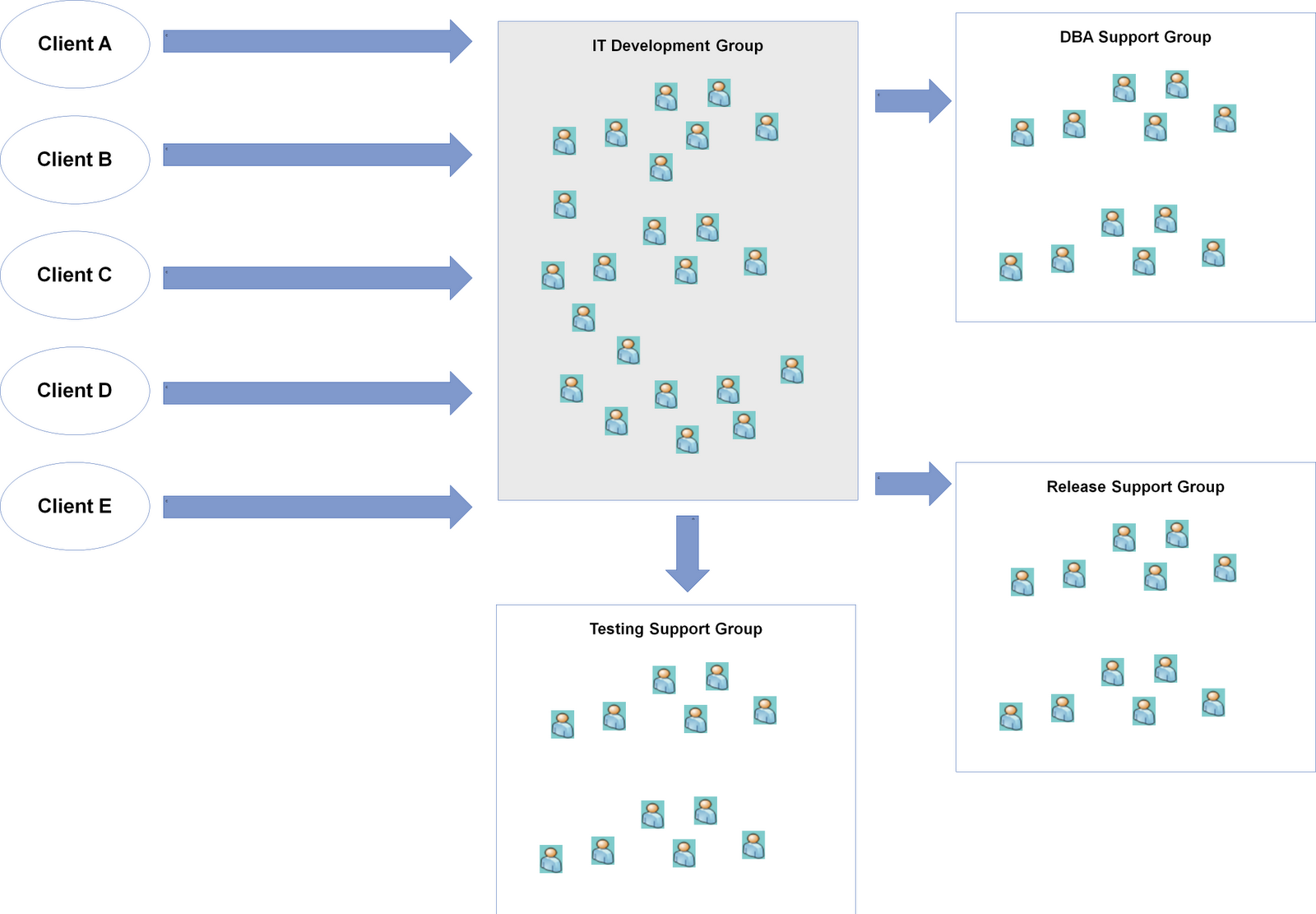
In our scenario, we were helping an IT Development Group adopt Kanban. To start, we need to first identify who are upstream parties that give us work, in this it's the clients/business themselves that have a PM/BA function and there are 5 of them. There is one downstream group, the Release Support Group that is responsible for packaging, and pushing code into staging and production. The final group to look at is other support groups which tends to be a key consideration in enterprise settings since most IT organizations have moved towards functional consolidation. For this particular group, they rely on a DBA Support Group, and a Testing Support Group in order for them to complete their work and pass it to the release group.
Step 2) Identify the work types that come in from the upstream provider and work with the IT Development Group to agree on a set of standard work types to setup a "Work Type Filter"
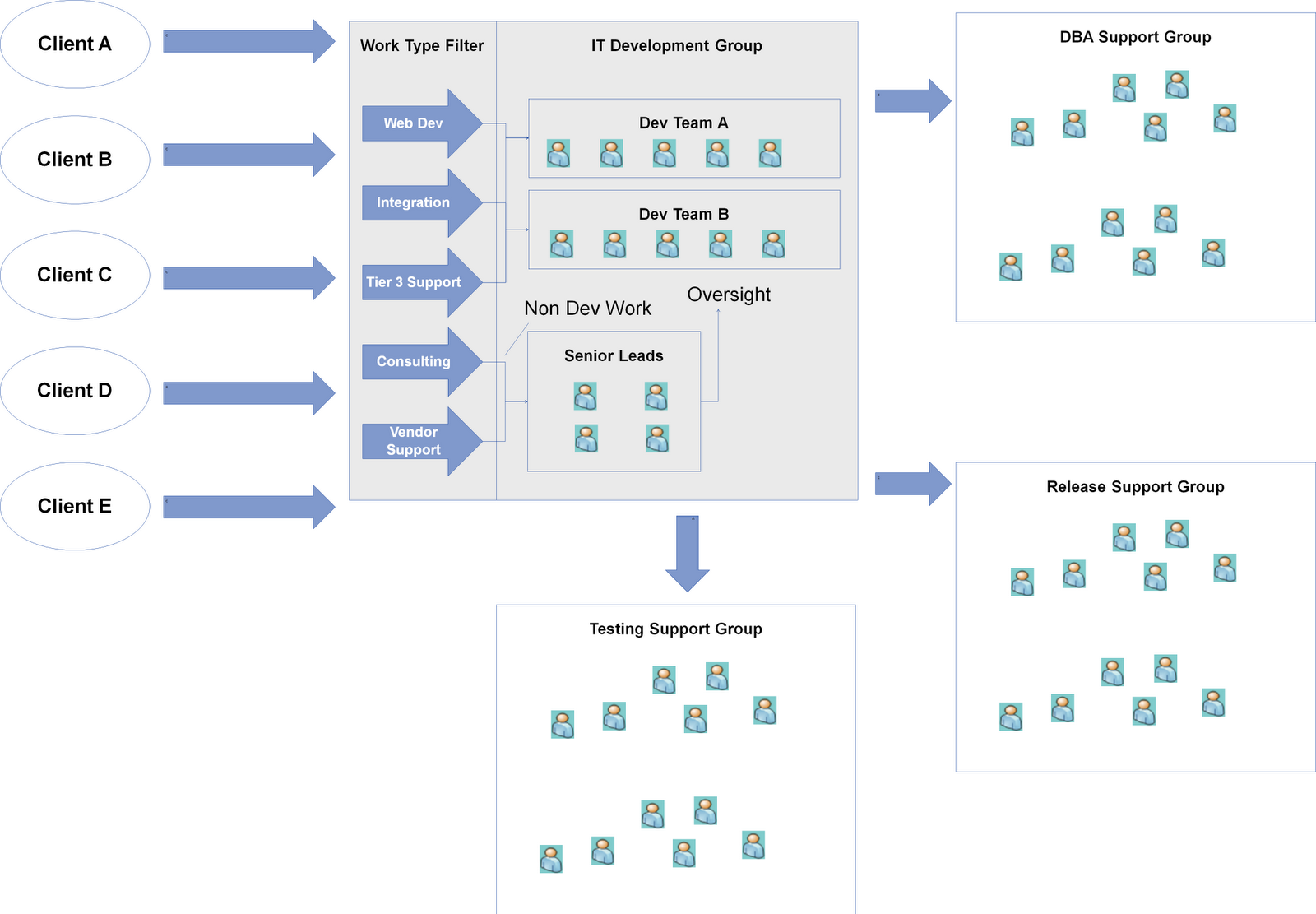
One of the lessons we learned during our work with a number of teams is the importance to treat the work type analysis as a capability and not a one-time event. Work type requests evolve over time and the team needs to develop the capability to conduct this activity and evolve a standard set of work types. I find thinking of this as implementing a Work Type Filter for the team helpful so they understand it's a capability and mechanism they need to operationalize. Work type analysis tends to be always be an interesting conversation with the IT Development Group in enterprise IT settings since the development teams will have other "responsibilities" besides writing code. They are often called upon by the client or other groups to provide two types of non-development services, Consulting, and Vendor Support / Management. Since functional consolidation tends to exist in most IT organizations I have seen, some type of centralized PM/BA function is often responsible for gathering requirements and providing estimates and plans. These groups lack the technical knowledge to complete these activities and as a result seek out the development groups for help. The second type of non-development request is often Vendor Support / Management. Business demand for solutions often tends to be non-stable and peaks near the end of the annual budgeting cycle as they feel the pressure to spend their budget which causes demand to exceed internal development capacity which in turn leads to the organization running to scale up with external vendors to take on the extra work. This will generate some work for the development group as the PMs will often ask the group to provide technical oversight or support to guide design, coding and help with code integration and promotions. I find it extremely helpful to separate these non-development requests from development work types since they often cause noise in the system and impact capacity in a different way. Turning back to our real-world example, here's what we ended up with:
Step 3) Map out the internal value stream, and identify where hand-offs and coordination with support groups occur in the process
Now that we understand the boundaries of our Kanban system we can start digging into the internal workings and understand how everything connects. Value stream mapping is often a useful tool for this, but I find keeping it simple works best. The important part of this step is to explicitly map out where the "interface" to the team is with other support groups and understand what information / value / artifacts is traded (i.e. what the interface contract should look like).
Step 4) Visualize all work in terms of the standard work types, let the system run to understand throughput and then set WIP limits with an emphasis on the input queue and external support group columns
At the end of step 3, we should have a kanban board and we can start onboarding all the work the IT Development Group is currently working on in terms of the standard work types we defined for the Work Type Filter. I find many teams struggle with setting WIP limits right away, and they need to use the Kanban system for 2-4 weeks before they have the right comfort level to have this discussion. At that point, the throughput metric should be tracked as this will provide a helpful frame of reference to set the initial guesstimate for the WIP limits. The key columns I focus on with the group is the input queue and external hand-off columns. The rationale behind focusing on these columns is they are the interfaces to the outside world and we want to start setting some expectations and commitments around these as the IT Development Group needs their help to deliver work. The input queue keeps them fed and the hand-off columns keep them running. I often leverage the throughput metric to orient the team around a WIP limit for the input queue based on the simple guideline of only take in what you can finish.
Step 5) Expose the queues to the clients and help setup and operationalize a prioritization framework as a Prioritization Filter
At this point, we expose the queues to the clients and start pushing prioritization of work to the customer. We also find in enterprise IT settings, providing only a next/this month queue is insufficient for their planning process. As a result we often provide a prioritized backlog mechanism with two replenishment cadences, an annual/quarterly one for strategic/budget planning a monthly one for just-in-time decisions. This is where we often see the most churn and is typically the most challenging part of the Kanban process. Many IT organizations are great at prioritizing within one group, but across organizational groups is a struggle despite attempts at elaborate and agonizing prioritization committees/boards. To help with this problem, the Kanban system arms us with two pieces of information, a common unit of currency (the standard work types) and delivery throughput. Leveraging these two pieces of information, we recommend working with the clients to analyze all their known demand, break it down using the Work Type Filter into our standard work types, and then calculating the gap between demand vs capacity in terms of throughput. Once the gap is known, there are two options, scaling up with more external vendors or prioritizing the work. In this scenario, scaling up was not an option due to the tight deadlines and the ramp up time needed to onboard new resources so we had to go with the prioritization option. To help with the prioritization problem, we recommend holding a workshop to align the requests with strategic priorities for the organization and then applying a FIFO policy to these requests while considering true fixed date items. This provides a workable interim solution as it forces the clients to focus on today with FIFO. The goal is to get to a set of demand channels based on what's ready to go now or soon and set % allocation against these channels. We then provide the client an opportunity to adjust the % allocation during the monthly replenishment meetings.
After this step, you should have a fully operational Kanban system. Now the hard but fun part remains which is evolving it and optimizing it for performance.
A blog based on my experiences and thoughts on helping software delivery organizations change from good to great by pragmatically applying agile, lean and other modern day approaches.
Showing posts with label kanban. Show all posts
Thursday, December 8, 2011
Monday, August 1, 2011
Maximizing the Benefits of Kanban as an Accelerator for Lean/Agile Transformations
One of the common approaches to many Lean/Agile Transformations is to start off with a set of "pilots". Typically these are selected based on the likelihood of success, priority and business risk. Often six months or so down the line after a few successful pilots the organization is eager to accelerate the process and attempts a larger scaling initiative to spread adoption. At this point the organization typically hits a wall as they run into a new set of challenges with the new teams/units being "transformed":
As an alternative to the piloting approach is a Kanban change management approach to transformations. The great thing about Kanban is that it allows an organization going through a transformation to adjust the pace of change from fast to slow depending on the tolerance of change within the organization. The only requirement is to ask each team/unit to follow a subset of the Kanban properties:

The J-Curve is the amount of disruption/pain an organization goes through when change happens. If you are starting/going through a Lean/Agile Transformation today, this approach is worth considering if you are facing a few of the challenges I discussed.
I'll blog more about the specifics for how we are applying the Kanban change approach in a current large-scale transformation in a later blog post.
- These teams/units are typically less enthusiastic about the change - pilots are typically "cherry-picked" and are often the most capable and enthusiastic of the change while the rest of the organization is not
- Larger and more legacy systems/teams bring about different challenges the pilots did not face
- Limited capacity and budget within the organization to support the larger scale adoption resulting in less time spent with the team/units
- Executive deadline for the transformation looms closer, typically organizations are looking for organization wide results within a year or two
As an alternative to the piloting approach is a Kanban change management approach to transformations. The great thing about Kanban is that it allows an organization going through a transformation to adjust the pace of change from fast to slow depending on the tolerance of change within the organization. The only requirement is to ask each team/unit to follow a subset of the Kanban properties:
- Visualize what you do today
- Limit the amount of work in progress
- Improve flow
The J-Curve is the amount of disruption/pain an organization goes through when change happens. If you are starting/going through a Lean/Agile Transformation today, this approach is worth considering if you are facing a few of the challenges I discussed.
I'll blog more about the specifics for how we are applying the Kanban change approach in a current large-scale transformation in a later blog post.
Labels:
Agile,
change management,
kanban,
Lean,
transformation
Friday, March 11, 2011
Kanban - Add colour to your work to help the team focus
One of the aspects I find valuable with Kanban, is the work visualization. However, sometimes I find that the work is so chaotic/iterative and collaborative in some portions of the process that the standard columns and rows in the kanban board don't provide enough flexibility. You'll see this when you have one work item that requires separate but related work from multiple team members due to their specialization.
In these situations, I avoid trying to fit the highly iterative work into columns and rows, and collapse them together into a single step on the board. The problem I run into when I do that, is it becomes hard for the team to figure out who is working on what and what work remains to be done on the work item.
To solve this problem, I apply colour to the work using coloured stickies that I "tag" on work items to denote what's be done on each particular work item.
In these situations, I avoid trying to fit the highly iterative work into columns and rows, and collapse them together into a single step on the board. The problem I run into when I do that, is it becomes hard for the team to figure out who is working on what and what work remains to be done on the work item.
To solve this problem, I apply colour to the work using coloured stickies that I "tag" on work items to denote what's be done on each particular work item.
In this example, the team pulls a work item (user story) into the "Create FitNesse Template and Automate" column of the board. To move an item through this part of the delivery process, requires the team to define detailed acceptance criteria in the language of the domain model, get it into a FitNesse page, and then automate the tests. This requires at least three specialized skillsets, a business analyst who understands the requirements that can help define the acceptance criteria, a developer that can verify that the acceptance criteria can be automated and develop the automation code if needed (fixtures etc.) and an architect/product owner that can review the acceptance criteria. Also, the work is not necessarily sequential and may be done in parallel or require multiple iterations.
To help visualize the work for the team, we applied coloured stickies that are tagged to each work item once something has been completed on it. For example, if the FitNesse template is done and data is defined than we tag it with a red sticky. If automation is completed / not required than it is tagged with a blue sticky and upon review from the architect/product owner we tag it as yellow.
A neat result of this process, is that each team member can immediately tell what item they should be working on. The business analyst just needs to look for work items that are missing red tags, which is a signal for them work. Similarly, blue for developers and yellow for the architects/product owners.
Labels:
Agile,
kanban,
Lean,
self-organization,
visualization
Thursday, September 2, 2010
Setting up an agile team room
It's Week 2 of our agile project and thought it would be neat to share an agile team room that we have put together for our current project. There is always a bit of thought that needs to go into making the workspace "effective". The room needs to support a project of ~20 resources by facilitating a daily stand-up of "walking the board", parallel analysis and design sessions of small groups 3 - 6 people and provide instant visibility into key project artifacts. We have decided not to co-locate the developers into this room and instead looking to bring in 1 - 2 desktops with environment access for pairing, spiking and design collaboration sessions. Still waiting for the desktops right now.
Here's a play by play of the room during Week 0:
We just threw everything up against a large wall and we didn't have much artifacts at that time, just a system context, story map, CRC cards, and a high-level value stream (on the right).
Shortly after, we moved into a dedicated room and we put some effort into thinking about the 5s from lean to help optimize the workspace.
Low-fidelity system context mapping exercise, planning to soft copy this into something more elegant once it stabilizes.
Similar set-up for the CRC card modeling. Again we are sticking to low-fidelity design. Notice the handy bin of cards, stickies and other physical items that are easily accessible during modeling sessions.
Finally, a table with all the current "big upfront requirements documents" provided by the business. Unfortunately, this is a necessary evil as we have yet to transition the business into the agile/lean culture of doing requirements. Notice the difference in "information radiation" between these docs and the rest of our "agile artifacts" around the room.
Overall, looking forward to seeing how this room continues to evolve.
Here's a play by play of the room during Week 0:
We just threw everything up against a large wall and we didn't have much artifacts at that time, just a system context, story map, CRC cards, and a high-level value stream (on the right).
Shortly after, we moved into a dedicated room and we put some effort into thinking about the 5s from lean to help optimize the workspace.
Our full end-to-end Kanban board is operational and running now with an issue escalation board to the far right.
Rapidly growing story map with system metaphor diagrams (state machine, process flow) below it for easy accessibility during analysis and design sessions.Low-fidelity system context mapping exercise, planning to soft copy this into something more elegant once it stabilizes.
Similar set-up for the CRC card modeling. Again we are sticking to low-fidelity design. Notice the handy bin of cards, stickies and other physical items that are easily accessible during modeling sessions.
Finally, a table with all the current "big upfront requirements documents" provided by the business. Unfortunately, this is a necessary evil as we have yet to transition the business into the agile/lean culture of doing requirements. Notice the difference in "information radiation" between these docs and the rest of our "agile artifacts" around the room.
Overall, looking forward to seeing how this room continues to evolve.
Subscribe to:
Posts (Atom)


