It's been awhile since I blogged, wanted to share a talk a colleague (Raj Mudhar) and myself gave on a case study of making agile@scale work for a global financial services organization across 50 agile teams. Hope this is interesting for folks and the community.
http://www.infoq.com/presentations/large-scale-agile-50-teams
Sunday, March 8, 2015


Monday, July 30, 2012
Throughput Planning - Why Project Managers Should Like Lean and Agile
Project managers in IT have a tough job. I've been there myself, and I have also coached a large number of project managers (PM) throughout my travels consulting for a number of organizations around the world. One of the biggest challenges a PM faces is managing the iron triangle of time, cost and scope while wrestling with never ending waves of change and uncertainty as they sheppard the team and project to completion. The typical tool most PMs have been trained on is the work break down structure (WBS) and being schooled by institutions such as PMI, that the best way to manage change and gain predictability is to track at the task and resource level. Unfortunately this approach tends to fail as project complexity increases and most experienced PMs that have the battle scars of large complex projects learn quickly that detailed planning and tracking doesn't help manage change or gain predictability. Trying to keep up with a large rapidly changing project is like playing Tetris on level 20, good luck.
 |
| Game Over - Trying to keep up with a complex project plan |
At this stage of their career, the tendency is to move from detailed task and resource tracking to focus on milestones and deliverables tracking to reduce the detailed planning that doesn't justify the cost vs value of keeping it up to date. While this lighter weight approach is better as it frees up the PMs time from updating project plans and chasing people for status and allows them to spend more time on managing the client, leading the team and resolving issues, it has also has flaws. At some point in the large hairy project, the client or someone else will launch a large number of changes at the project. Change is inevitable in projects for knowledge work. During this time, the PM is struggling to answer the questions of "what is the impact of these changes?", "will we be on time?", and "what can we do to get on track again?". Tracking milestones and deliverables fails miserably at answering those questions. The PM desperate for answers and in need to "show progress" tends to fall back to detailed plan in an attempt to resume control forgetting why they avoided doing this in the first place. It's a vicious cycle and leaves the project at risk.
Lean and Agile to the Rescue
Benefits of Throughput Planning
If your a project manager that is struggling to manage the chaos and complexity in your projects, I encourage you to take a look at Throughput Planning and look at how to make your project more lean and agile. It reduces your workload in tracking, simplifies impact assessments, and reduces risk.
Thursday, February 23, 2012
Lean Thinking Tools for Improving Your Portfolio Planning and Prioritization Process
We just started an IT Transformation for a new client that is looking to fundamentally change the way they deliver IT services and application development. As part of the transformation we are helping the organization improve their portfolio planning and prioritization process to provide greater transparency, flexibility and control (yes control and agile does go together). Whenever we work with clients in this area, the first step we take is help them break down their old mental model of portfolio management and take a fresh perspective. To do this we introduce four thinking tools to help them wrap their heads around the new concepts. The goal of the four thinking tools is to help organizations look at planning and prioritization as an economic bargaining system.


Thinking Tool 1: Three level planning approach controlled by cadences

The first tool is to stop looking at portfolio planning and prioritization as a one time annual budgeting process and instead move towards a frequent multi-level planning system for portfolio management. Each level of planning should have well-defined units of work, cadence, and a form of currency (more on that later). The specific goals of each level are:
Strategic Planning:
- Identify ideas to realize strategic business objectives
- Set allocation based on LOB / Program / Work Type
- Longer Cadence, example quarterly
Project Planning:
- Idea analysis and project planning
- Define projects in terms of business valued features based on a high-level solution
- Medium Cadence, example monthly
Operational Planning:
- Project work intake with frequent work replenishment for solution delivery
- Dedicated intake channel for emergencies, small enhancements and bug fixes
- Short Cadence, example bi-weekly
Thinking Tool 2: Breaking projects into minimal releases and business valued features

Based on Thinking Tool 1, if the organization is able to establish more frequent strategic planning cycles (e.g. quarterly) than this encourages projects to be broken down into smaller chunks that can fit into those cycles. This allows IT to work more frequently with the business to understand what the high value features are and get to quick wins faster. At the same time this also provides greater transparency of progress into budget spent vs budget realized in terms of real value (i.e. a potentially shippable system).
Thinking Tool 3: Planning informed by capacity in terms of throughput to level demand

One of the challenges with traditional planning approaches is that capacity is not used to inform the planning process. To build an effective planning and prioritization process the organization needs to understand capacity in terms of throughput (how much value can I deliver within x amount of time) and level demand based on available capacity. What we often see broken with traditional processes is budget being the only input into the planning process and that is typically not the "bottleneck" or scare resource in the organization. Money is abundant, time is not which leads to the end of year madness many organizations fire fight their way through.
Thinking Tool 4: Establishing currency to represent scarce resources provides a mechanism to facilitate exchange of value to promote liquidity and flexibility

The final piece to the puzzle is establishing a common unit of currency based on scarcity. Instead of throwing money at the problem, the organization starts looking at their delivery capabilities as system of work that has real constraints (i.e. time). The unit of currency we alluded to earlier in Thinking Tool 3, is throughput which represents work/value in terms of time. The currency is then limited based on scarcity which is represented as work-in-progress (WIP) limit that controls the backlog and queues that work fits into.
By understanding these four thinking tools they provide an organization with the foundations for establishing a fast feedback portfolio system managed by multi-level planning with cadences, defining projects into smaller increments of value, balancing demand based on throughput, and planning and prioritizing based on a common unit of currency that represents scarcity.
In a later post, I'll share a set of planning and prioritization patterns we use to implement these concepts.
Thursday, January 26, 2012
Adopting Retrospectives? Start by learning to learn
Retrospectives is a great practice that is widely adopted by agile teams. I've worked with a large number of teams across different organizations and one of the first lessons you learn after you coached a number of teams is that while improving team performance to deliver faster and better is important, what's even more important is the team learning to learn. Continuous improvement is a big commitment, and not easy to do especially for knowledge work. That's why I tend to take a different approach for teams new to retrospectives and instead of setting improvement as the goal for them, I focus them into learning how to discuss problems in a structured way and coming up with simple tactical fixes that can be implemented fast.
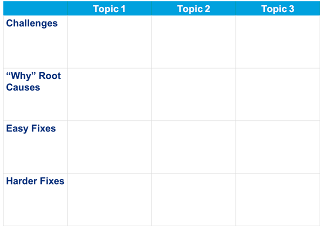 Structured - many teams struggle to discuss problems effectively, the first goal is to find a simple framework to structure the problem discussion. A simple one I use often is setting a simple matrix on a big whiteboard, the top row I place the discussion topics, divide them with vertical lines and then divide the verticals horizontally into 4 buckets, challenges, causes ("why"), easy fix, harder fix. This is a simplified 5 whys approach to root case analysis. I then get the team to brainstorm and start mapping stickies into these buckets. This provides a simple structure to the conversation.
 Structured - many teams struggle to discuss problems effectively, the first goal is to find a simple framework to structure the problem discussion. A simple one I use often is setting a simple matrix on a big whiteboard, the top row I place the discussion topics, divide them with vertical lines and then divide the verticals horizontally into 4 buckets, challenges, causes ("why"), easy fix, harder fix. This is a simplified 5 whys approach to root case analysis. I then get the team to brainstorm and start mapping stickies into these buckets. This provides a simple structure to the conversation.
Simple and Fast - Once the team identifies a number of improvements or fixes they believe can improve their problems, I encourage them to start by selecting the simple ones. Within their span of control, limited analysis needed, and easy to implement. Finally, the fixes should be fast to do, 1-2 days max in effort and duration.
It's not initially important whether the fixes actually provide sustainable improvement or not. That will come with time once the team learns how to learn by tackling smaller changes often. This approach allows them to move at their own pace, is sustainable and will likely provide a positive reinforcement as they can finish what they started. Stop starting and start finishing also applies to continuous improvement.
Thursday, December 8, 2011
Five Step Illustrated Guide to Setup a Kanban System in an Enterprise Organization
We've been through a significant number of Kanban implementations and our approach has largely been based on the approach outlined in David J. Andersons Kanban book. During our travels, we find that we sometimes need to make certain adjustments to the standard steps and during our recent work with a large-scale organizational transformation where we are applying Kanban across the entire organization of 200+ people we have encountered some situations that you only run into when you are in a larger enterprise setting. I thought it would be useful to others for me to provide a real-world step by step illustration of how we have been approaching the problem. If your about to kick-off a Kanban adoption in an enterprise IT organization or in the midst of one and struggling, you may find this useful. It's a simple 5 step approach that has always produced good outcomes for us while respecting the pace of change a typical IT organization can absorb.
Step 1) Identify the various upstream and downstream groups with a special emphasis on external "support groups" for the group adopting Kanban
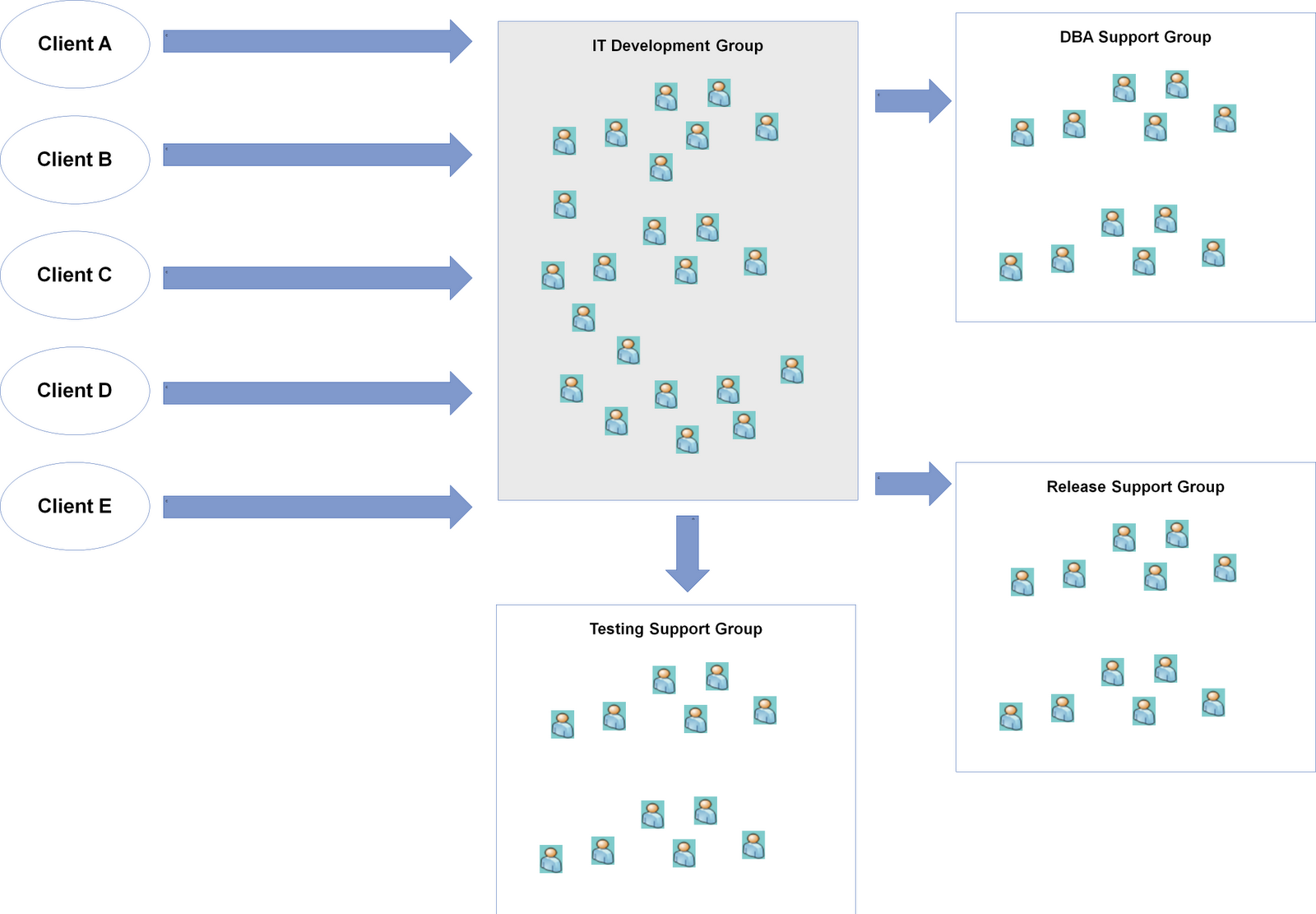
In our scenario, we were helping an IT Development Group adopt Kanban. To start, we need to first identify who are upstream parties that give us work, in this it's the clients/business themselves that have a PM/BA function and there are 5 of them. There is one downstream group, the Release Support Group that is responsible for packaging, and pushing code into staging and production. The final group to look at is other support groups which tends to be a key consideration in enterprise settings since most IT organizations have moved towards functional consolidation. For this particular group, they rely on a DBA Support Group, and a Testing Support Group in order for them to complete their work and pass it to the release group.

Step 2) Identify the work types that come in from the upstream provider and work with the IT Development Group to agree on a set of standard work types to setup a "Work Type Filter"
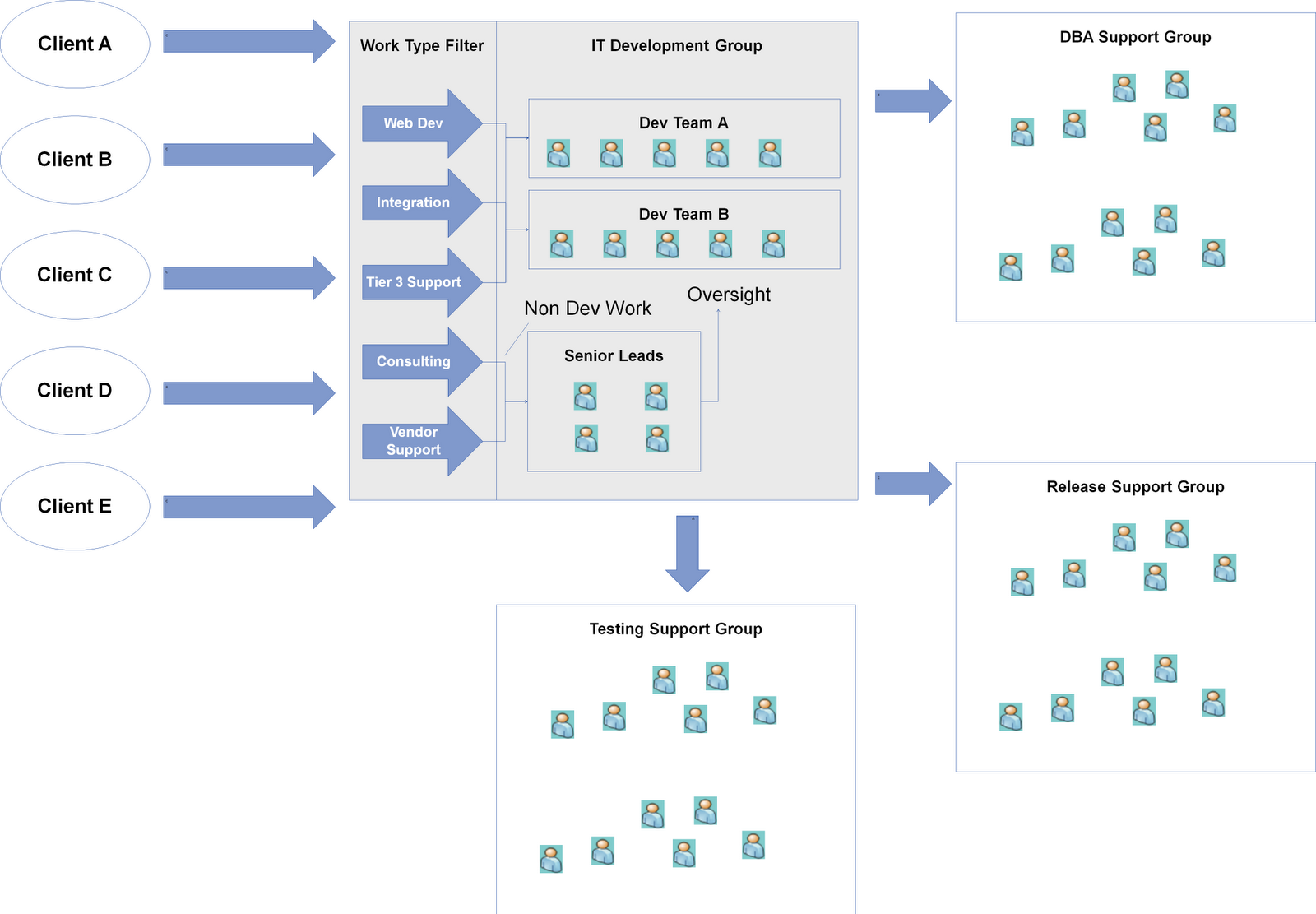
One of the lessons we learned during our work with a number of teams is the importance to treat the work type analysis as a capability and not a one-time event. Work type requests evolve over time and the team needs to develop the capability to conduct this activity and evolve a standard set of work types. I find thinking of this as implementing a Work Type Filter for the team helpful so they understand it's a capability and mechanism they need to operationalize. Work type analysis tends to be always be an interesting conversation with the IT Development Group in enterprise IT settings since the development teams will have other "responsibilities" besides writing code. They are often called upon by the client or other groups to provide two types of non-development services, Consulting, and Vendor Support / Management. Since functional consolidation tends to exist in most IT organizations I have seen, some type of centralized PM/BA function is often responsible for gathering requirements and providing estimates and plans. These groups lack the technical knowledge to complete these activities and as a result seek out the development groups for help. The second type of non-development request is often Vendor Support / Management. Business demand for solutions often tends to be non-stable and peaks near the end of the annual budgeting cycle as they feel the pressure to spend their budget which causes demand to exceed internal development capacity which in turn leads to the organization running to scale up with external vendors to take on the extra work. This will generate some work for the development group as the PMs will often ask the group to provide technical oversight or support to guide design, coding and help with code integration and promotions. I find it extremely helpful to separate these non-development requests from development work types since they often cause noise in the system and impact capacity in a different way. Turning back to our real-world example, here's what we ended up with:

Step 3) Map out the internal value stream, and identify where hand-offs and coordination with support groups occur in the process
Now that we understand the boundaries of our Kanban system we can start digging into the internal workings and understand how everything connects. Value stream mapping is often a useful tool for this, but I find keeping it simple works best. The important part of this step is to explicitly map out where the "interface" to the team is with other support groups and understand what information / value / artifacts is traded (i.e. what the interface contract should look like).

Step 4) Visualize all work in terms of the standard work types, let the system run to understand throughput and then set WIP limits with an emphasis on the input queue and external support group columns
At the end of step 3, we should have a kanban board and we can start onboarding all the work the IT Development Group is currently working on in terms of the standard work types we defined for the Work Type Filter. I find many teams struggle with setting WIP limits right away, and they need to use the Kanban system for 2-4 weeks before they have the right comfort level to have this discussion. At that point, the throughput metric should be tracked as this will provide a helpful frame of reference to set the initial guesstimate for the WIP limits. The key columns I focus on with the group is the input queue and external hand-off columns. The rationale behind focusing on these columns is they are the interfaces to the outside world and we want to start setting some expectations and commitments around these as the IT Development Group needs their help to deliver work. The input queue keeps them fed and the hand-off columns keep them running. I often leverage the throughput metric to orient the team around a WIP limit for the input queue based on the simple guideline of only take in what you can finish.

Step 5) Expose the queues to the clients and help setup and operationalize a prioritization framework as a Prioritization Filter
At this point, we expose the queues to the clients and start pushing prioritization of work to the customer. We also find in enterprise IT settings, providing only a next/this month queue is insufficient for their planning process. As a result we often provide a prioritized backlog mechanism with two replenishment cadences, an annual/quarterly one for strategic/budget planning a monthly one for just-in-time decisions. This is where we often see the most churn and is typically the most challenging part of the Kanban process. Many IT organizations are great at prioritizing within one group, but across organizational groups is a struggle despite attempts at elaborate and agonizing prioritization committees/boards. To help with this problem, the Kanban system arms us with two pieces of information, a common unit of currency (the standard work types) and delivery throughput. Leveraging these two pieces of information, we recommend working with the clients to analyze all their known demand, break it down using the Work Type Filter into our standard work types, and then calculating the gap between demand vs capacity in terms of throughput. Once the gap is known, there are two options, scaling up with more external vendors or prioritizing the work. In this scenario, scaling up was not an option due to the tight deadlines and the ramp up time needed to onboard new resources so we had to go with the prioritization option. To help with the prioritization problem, we recommend holding a workshop to align the requests with strategic priorities for the organization and then applying a FIFO policy to these requests while considering true fixed date items. This provides a workable interim solution as it forces the clients to focus on today with FIFO. The goal is to get to a set of demand channels based on what's ready to go now or soon and set % allocation against these channels. We then provide the client an opportunity to adjust the % allocation during the monthly replenishment meetings.

After this step, you should have a fully operational Kanban system. Now the hard but fun part remains which is evolving it and optimizing it for performance.
Step 1) Identify the various upstream and downstream groups with a special emphasis on external "support groups" for the group adopting Kanban
In our scenario, we were helping an IT Development Group adopt Kanban. To start, we need to first identify who are upstream parties that give us work, in this it's the clients/business themselves that have a PM/BA function and there are 5 of them. There is one downstream group, the Release Support Group that is responsible for packaging, and pushing code into staging and production. The final group to look at is other support groups which tends to be a key consideration in enterprise settings since most IT organizations have moved towards functional consolidation. For this particular group, they rely on a DBA Support Group, and a Testing Support Group in order for them to complete their work and pass it to the release group.
Step 2) Identify the work types that come in from the upstream provider and work with the IT Development Group to agree on a set of standard work types to setup a "Work Type Filter"
One of the lessons we learned during our work with a number of teams is the importance to treat the work type analysis as a capability and not a one-time event. Work type requests evolve over time and the team needs to develop the capability to conduct this activity and evolve a standard set of work types. I find thinking of this as implementing a Work Type Filter for the team helpful so they understand it's a capability and mechanism they need to operationalize. Work type analysis tends to be always be an interesting conversation with the IT Development Group in enterprise IT settings since the development teams will have other "responsibilities" besides writing code. They are often called upon by the client or other groups to provide two types of non-development services, Consulting, and Vendor Support / Management. Since functional consolidation tends to exist in most IT organizations I have seen, some type of centralized PM/BA function is often responsible for gathering requirements and providing estimates and plans. These groups lack the technical knowledge to complete these activities and as a result seek out the development groups for help. The second type of non-development request is often Vendor Support / Management. Business demand for solutions often tends to be non-stable and peaks near the end of the annual budgeting cycle as they feel the pressure to spend their budget which causes demand to exceed internal development capacity which in turn leads to the organization running to scale up with external vendors to take on the extra work. This will generate some work for the development group as the PMs will often ask the group to provide technical oversight or support to guide design, coding and help with code integration and promotions. I find it extremely helpful to separate these non-development requests from development work types since they often cause noise in the system and impact capacity in a different way. Turning back to our real-world example, here's what we ended up with:
Step 3) Map out the internal value stream, and identify where hand-offs and coordination with support groups occur in the process
Now that we understand the boundaries of our Kanban system we can start digging into the internal workings and understand how everything connects. Value stream mapping is often a useful tool for this, but I find keeping it simple works best. The important part of this step is to explicitly map out where the "interface" to the team is with other support groups and understand what information / value / artifacts is traded (i.e. what the interface contract should look like).

Step 4) Visualize all work in terms of the standard work types, let the system run to understand throughput and then set WIP limits with an emphasis on the input queue and external support group columns
At the end of step 3, we should have a kanban board and we can start onboarding all the work the IT Development Group is currently working on in terms of the standard work types we defined for the Work Type Filter. I find many teams struggle with setting WIP limits right away, and they need to use the Kanban system for 2-4 weeks before they have the right comfort level to have this discussion. At that point, the throughput metric should be tracked as this will provide a helpful frame of reference to set the initial guesstimate for the WIP limits. The key columns I focus on with the group is the input queue and external hand-off columns. The rationale behind focusing on these columns is they are the interfaces to the outside world and we want to start setting some expectations and commitments around these as the IT Development Group needs their help to deliver work. The input queue keeps them fed and the hand-off columns keep them running. I often leverage the throughput metric to orient the team around a WIP limit for the input queue based on the simple guideline of only take in what you can finish.

Step 5) Expose the queues to the clients and help setup and operationalize a prioritization framework as a Prioritization Filter
At this point, we expose the queues to the clients and start pushing prioritization of work to the customer. We also find in enterprise IT settings, providing only a next/this month queue is insufficient for their planning process. As a result we often provide a prioritized backlog mechanism with two replenishment cadences, an annual/quarterly one for strategic/budget planning a monthly one for just-in-time decisions. This is where we often see the most churn and is typically the most challenging part of the Kanban process. Many IT organizations are great at prioritizing within one group, but across organizational groups is a struggle despite attempts at elaborate and agonizing prioritization committees/boards. To help with this problem, the Kanban system arms us with two pieces of information, a common unit of currency (the standard work types) and delivery throughput. Leveraging these two pieces of information, we recommend working with the clients to analyze all their known demand, break it down using the Work Type Filter into our standard work types, and then calculating the gap between demand vs capacity in terms of throughput. Once the gap is known, there are two options, scaling up with more external vendors or prioritizing the work. In this scenario, scaling up was not an option due to the tight deadlines and the ramp up time needed to onboard new resources so we had to go with the prioritization option. To help with the prioritization problem, we recommend holding a workshop to align the requests with strategic priorities for the organization and then applying a FIFO policy to these requests while considering true fixed date items. This provides a workable interim solution as it forces the clients to focus on today with FIFO. The goal is to get to a set of demand channels based on what's ready to go now or soon and set % allocation against these channels. We then provide the client an opportunity to adjust the % allocation during the monthly replenishment meetings.

After this step, you should have a fully operational Kanban system. Now the hard but fun part remains which is evolving it and optimizing it for performance.
Monday, August 1, 2011
Maximizing the Benefits of Kanban as an Accelerator for Lean/Agile Transformations
One of the common approaches to many Lean/Agile Transformations is to start off with a set of "pilots". Typically these are selected based on the likelihood of success, priority and business risk. Often six months or so down the line after a few successful pilots the organization is eager to accelerate the process and attempts a larger scaling initiative to spread adoption. At this point the organization typically hits a wall as they run into a new set of challenges with the new teams/units being "transformed":
As an alternative to the piloting approach is a Kanban change management approach to transformations. The great thing about Kanban is that it allows an organization going through a transformation to adjust the pace of change from fast to slow depending on the tolerance of change within the organization. The only requirement is to ask each team/unit to follow a subset of the Kanban properties:

The J-Curve is the amount of disruption/pain an organization goes through when change happens. If you are starting/going through a Lean/Agile Transformation today, this approach is worth considering if you are facing a few of the challenges I discussed.
I'll blog more about the specifics for how we are applying the Kanban change approach in a current large-scale transformation in a later blog post.
- These teams/units are typically less enthusiastic about the change - pilots are typically "cherry-picked" and are often the most capable and enthusiastic of the change while the rest of the organization is not
- Larger and more legacy systems/teams bring about different challenges the pilots did not face
- Limited capacity and budget within the organization to support the larger scale adoption resulting in less time spent with the team/units
- Executive deadline for the transformation looms closer, typically organizations are looking for organization wide results within a year or two
As an alternative to the piloting approach is a Kanban change management approach to transformations. The great thing about Kanban is that it allows an organization going through a transformation to adjust the pace of change from fast to slow depending on the tolerance of change within the organization. The only requirement is to ask each team/unit to follow a subset of the Kanban properties:
- Visualize what you do today
- Limit the amount of work in progress
- Improve flow
The J-Curve is the amount of disruption/pain an organization goes through when change happens. If you are starting/going through a Lean/Agile Transformation today, this approach is worth considering if you are facing a few of the challenges I discussed.
I'll blog more about the specifics for how we are applying the Kanban change approach in a current large-scale transformation in a later blog post.
Wednesday, March 23, 2011
Why co-located team rooms are important
One of the most valuable aspects of co-locating a team in a common area is that it eliminates a lot of the "us vs them" mentality that tends to happen when team members are working in different locations. I have observed that it is a fairly natural occurrence in teams that are distributed to be less collaborative and helpful to each other if they are separated by distance.
For example, here's an interesting email conversation trail from a previous project between two distributed teams (in the same building but different floors and opposite ends of the building):
Email 1 from Debugging Developer:
Hi Developer B,
I was wondering if processing transaction A is supposed to work for ActionTest. I’m using the following data with an error of “failed to execute called process”, can you advise, thanks.
Data used:
Some complex XML message
Response email from Developer A:
You sent a transaction per below. The changes were not deployed on the tActionTest. I will have to rebuild that deployable. (It was deployed for the end-to-end process, not the test webservice.)
I can't find your request in the logs to check the error.
Thanks,
Developer A
Email 2 from Debugging Developer:
Ok so I guess it shouldn’t work until its been rebuilt right?
Response email from Developer A:
Yes, I forgot about deploying the test service because I was focusing on the integration model.
Developer X just deployed the most recent ProcessingComponent changes on the test service, and this included my code updates, so the service should work now.
ProcessTransactionService fails this sample request as per below:
< Failed OrderDetail(s) : 9084694735 ErrServiceQueryFail
and more complex XML/>
Thanks,
Developer A
Email 3 from Debugging Developer:
Great, yeah I see that error now, middleware integration admin logs for ActionTest still times out. I’m not sure why the error occurs, is there any way that I can dig deeper?
Response email from Developer A:
Look at the ProcessTransactionService.
Email 4 from Debugging Developer:
Any idea what “Failed Tranasaction(s) : 1234567 (error=-65608)” means? I understand that transactions with FDR of 232 and IBC of 456 must be used, so I specified the following request:
Some complex XML...
Response email from Developer A:
Did you intend to address this to me? I don't know this. AquaLogicBus is calling the ProcessTransactionService (java). This error is returned from the ProcessTransactionService.
Thanks,
Developer A
Email 5 from Debugging Developer:
Yeah, I just thought you might know, Developer B might have a better idea.
Developer B, I’m sending the request below to AquaLogicBus and get the error: “Failed Tranasaction(s) : 1234567 (error=-65608)”, tn I used is: ,
What rules are there for Transaction A?
Thanks.
Response email from Developer B:
But the error is self descriptive...the transaction is not unqiue i.e. processed...you cannot process the transaction twice/more in ProcessTransactionService.
Email 6 from Debugging Developer:
I have yet to trained myself to understand (error=-65608)
I’ll try more numbers even though numbers such as 1234567 and more also do not work for Transaction A, these numbers have not been processed since they were verified by GetStatus of the ProcessTransactionService returning ErrGetStatus.
After a bit more back and forth, finally the Debugging Developer discovered the root cause of the problem. In total, this took 6 hours and ~10 emails. Think this is a good example of the communication effectiveness Alistair Cockburn talks about:

Subscribe to:
Posts (Atom)